
Minecraft challenge
Hotbar Only
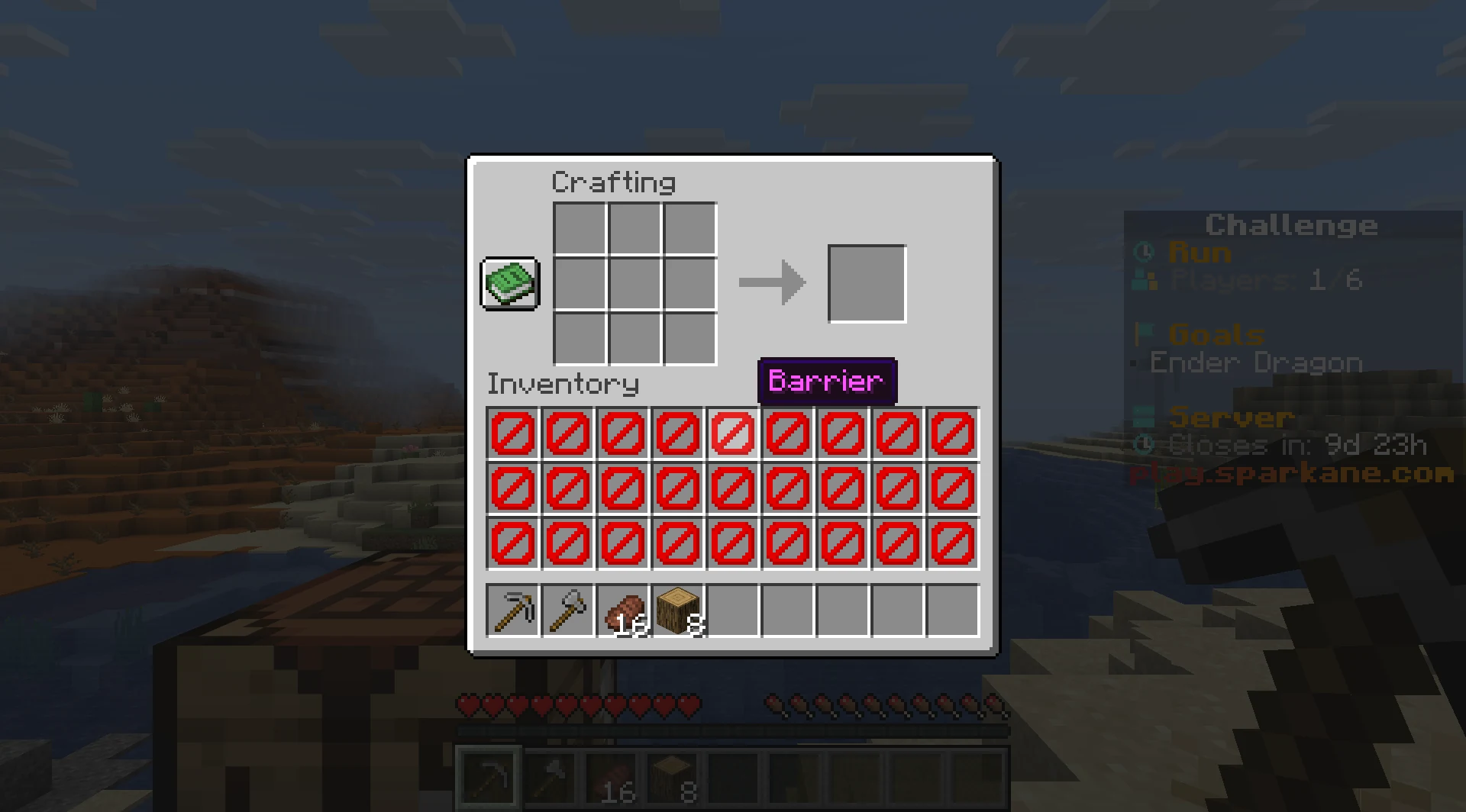
Your sword, pickaxe, food and blocks all have to fit into nine hotbar slots. The 27 slots above them are blocked. You can still use your off-hand and wear armor.
- Java & Bedrock
- Private server
- No extra mods
Nine slots, many choices
Choose every item on purpose
While the challenge is running, 27 storage slots outside the hotbar are restricted. You can keep normal items only in the nine hotbar slots. Your off-hand and armor slots remain usable.
When the rule activates, it moves existing items out of the restricted slots and into the hotbar. If the hotbar has no room, leftover items are dropped on the ground. Barriers mark the restricted slots, and clicks or drags into them are blocked.
27 storage slots are restricted. Your nine hotbar slots are your normal storage for items.
Example round: you find iron, food and a shield, but only have two free hotbar slots. The shield goes in your off-hand, leaving room for the iron and food in your hotbar.
What to expect from your run
- Rule complexity
- Only nine hotbar slots are free; your off-hand and armor stay usable outside the restriction.
- Experience
- Good priorities and a consistent hotbar layout help during exploration and combat.
- Time commitment
- Sorting and restocking take time. Plan your free slots before caves, fights and long journeys.
Plan around nine slots
Tips for Hotbar Only
Leave room for important finds before heading into the next cave.
- 01Assign consistent slots
- Reserve slots for tools, food, blocks and combat so you do not reorganize at the wrong moment.
- 02Use your off-hand
- A shield or another item in the off-hand expands your options without taking a hotbar slot.
- 03Choose what to keep
- Before a chest or fight, decide which item you want to carry. Restricted storage is not a temporary stash.
- 04Share the load with friends
- If you play with friends, share the load: one player carries extra food, another carries building blocks.
Even less room
Combine Hotbar Only with other challenges
A second rule can disrupt your small selection even further.
- Hotbar Only + Damage Clears Inventory
- Damage can clear your real items. Afterward, you still have only the nine hotbar slots.2 simultaneous challenges · Host needs Pro
- Hotbar Only + Crafting Randomizer
- Random crafting results must fit into the same nine slots. Leave an open slot whenever you craft.2 simultaneous challenges · Host needs Pro
The configurator shows which rules you can enable together. Some combinations do not suit every goal.
Hotbar Only FAQ
How the nine available inventory slots work.
How many inventory slots can I use?
What happens to items already in storage?
What is the challenge goal?
Your first run
Start your Hotbar Only run
You need Minecraft, but no extra mods or server hosting of your own.
- 1
Join Sparkane
Connect to
play.sparkane.com. We support 1.21.11 – 26.3 on Java. The “How to join on Java & Bedrock” guide covers both editions. - 2
Choose your challenge in the lobby
Choose the ready-made preset for your challenge at the NPC in the lobby. Its goal and rules are already set. To change them or combine challenges, open the optional web configurator.
- 3
Start your server and invite friends
Create your server from the preset or your custom configuration and wait for your server to be ready. Invite friends with
/invite <Name>. Java and Bedrock players can play together. - 4
Start the timer and play
Everyone ready? As the host, use
/timer start. You can then break blocks and the challenge rules become active. Use/timer pauseand/timer resumeto take a break and continue your run.